
 By Lesa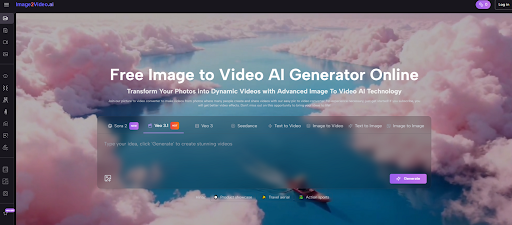
A single image can be visually strong and still feel unfinished in modern publishing. On social feeds, product pages, landing screens, and even internal presentations, stillness often loses attention before the visual idea has time to register. That is where Image to Video AI becomes useful in a practical sense. It does not ask people to become editors, animators, or motion designers first. Instead, it offers a lighter path: start with a photo, describe the movement you want, wait for processing, and review a short video result. In my view, the real significance is not just that a picture can move, but that creative decisions can now be tested faster than before, with much less production overhead.
A lot of digital work gets slowed down not by lack of ideas, but by the gap between an idea and its first visible draft. Someone knows the mood they want, the subject they want to emphasize, or the scene they want to make feel more alive, but turning that intention into motion traditionally requires extra tools, editing knowledge, and time. A browser-based image-to-video workflow changes that early stage. It lets people explore whether motion actually improves communication before they commit to a larger production process. That shift sounds small, but in many teams it changes how quickly concepts move from thought to usable output.
Why Still Images Often Stop Too Early
A good image already carries composition, mood, and subject focus. It can look polished, intentional, and emotionally clear. But in many real-world contexts, static visuals now compete in environments designed for motion. This is not only about social media trends. It also affects e-commerce, education, online storytelling, and brand communication.
What often happens is that a still image communicates enough to be appreciated, but not enough to hold attention for long. Motion adds a second layer of meaning. A slow push can create emphasis. A pan can guide the viewer through detail. A slight zoom can create emotional concentration. Even minimal movement changes the way the eye reads a frame.
Motion Turns Viewing Into Progression
A static image is usually consumed all at once. A moving image, even a short one, unfolds. That matters because unfolding gives the viewer a reason to stay for another second. In practical publishing, that extra second can be the difference between being ignored and being remembered.
Short Motion Can Feel More Native Online
Many online platforms reward visuals that begin communicating immediately. Long-form craftsmanship still matters in some spaces, but more often the winning format is short, clear, and easy to process. A quick image-to-video conversion fits that environment better than a still photo in many cases.
What Makes The Workflow Worth Paying Attention To
The homepage presents a process that is straightforward enough to understand quickly, and that clarity is part of the product’s appeal. It is not positioned like a dense editing suite with layers, timelines, and technical menus everywhere. Instead, it is framed as a conversion workflow that removes friction from the first draft stage.
Step One Begins With A Source Image
The process starts by choosing and uploading a picture. The platform says it supports JPEG and PNG formats, which keeps the entry point familiar. Most people already have usable assets in those formats, whether they come from a phone, camera, design export, or product library.
Step Two Uses Prompt Intent As Direction
After upload, the user enters a natural-language prompt describing the desired motion or outcome. This part is more important than it may look. The image provides the subject, but the prompt provides the behavior. In my observation, tools in this category become more useful when users understand that they are not just labeling the image. They are directing how the image should feel when it starts moving.
Step Three Relies On Processing Rather Than Manual Editing
The site explains that the system processes the request and that this stage typically takes about five minutes. This is a meaningful detail because it shapes expectations. The tool is not presented as a real-time editing interface. It is closer to a render-request model: you specify the task, the system handles generation, and you review the output after processing.
Step Four Ends With Review And Sharing
Once the status is complete, the result can be checked, downloaded, and shared. That sounds simple, but it reveals how the platform wants to fit into a real workflow. It is designed to create ready-to-use short-form video assets, not merely preview experiments that still demand major post-production afterward.
How The Platform Reframes Creative Work
The most interesting part of an image-to-video tool is not the novelty of animation. It is the way it changes who can participate in motion-based communication. A person does not need to master a professional editing environment to test an idea anymore.
It Lowers The Cost Of Exploration
Creative exploration usually becomes expensive when every variation requires extra manual labor. Here, the user can upload a photo, describe a motion idea, and see whether the concept works. That makes experimentation more available to small teams, individual creators, and people who may not have production support.
It Favors Existing Assets Over New Shoots
A lot of organizations and creators already have strong images. Product teams have catalog photos. marketers have campaign visuals. educators have diagrams and slides. creators have travel photos, artwork, and character images. The platform makes those assets more reusable instead of forcing users to start from raw video footage.
It Encourages Faster Decision Cycles
In many cases, the main challenge is not execution quality but decision delay. Teams debate whether a visual should become a video, whether a campaign needs more motion, or whether a still image is enough. A quick conversion tool helps answer that question earlier and with less internal friction.
Where The Product Features Become Meaningful
The homepage describes a number of features, but the useful way to read them is not as a checklist. The question is what they imply about intended use.
One Click Suggests Accessibility Over Complexity
The platform emphasizes easy creation and no need for deep technical experience. This suggests that the product is built for direct output rather than advanced manual craft. That is not a weakness. It simply means the value lies in speed and accessibility.
Effects Expand Use Cases Beyond Simple Slideshows
The site highlights a large effects library and professional tools. In theory, that could sound like generic marketing language. In practice, it suggests the platform is trying to avoid the flat, template-heavy feeling that many quick video tools produce. Variety in movement and treatment helps different use cases feel less repetitive.
Camera Controls Matter More Than People Think
The mention of pan, zoom, tilt, and rotation is especially useful. Camera motion is one of the fastest ways to make an image feel spatial rather than flat. In my testing mindset, subtle camera direction often makes more difference than dramatic visual effects.
Why Prompting Matters More Than Automation
The workflow is simple, but good output still depends on how clearly the user describes intent. That is one of the reasons these tools should not be mistaken for total creative automation.
Describe Movement Instead Of Repeating Content
If the image already shows a person, object, or place, the prompt does not need to spend all its energy naming what is already visible. It works better when the instruction explains what should happen: a slow cinematic zoom, a gentle drift, a reveal across the scene, or a subtle sense of depth.
Focused Prompts Usually Produce Better Motion
A short clip has limited room to carry multiple ambitions at once. If the instruction tries to force dramatic action, emotional storytelling, heavy cinematic style, and multiple moving focal points into a single result, the video can feel less coherent.
Restraint Often Looks More Credible
In my observation, image-to-video outputs are more convincing when the motion is controlled. A little movement can create atmosphere. Too much movement can make the result feel like it is trying to prove its own technology instead of serving the image.
Who Benefits Most From This Workflow
The site lists several kinds of users, and that range makes sense because the core value is not niche. It is about turning one existing visual into a more engaging format.
Marketers Need Faster Asset Variation
Marketing teams often have strong images but limited time to turn them into motion content. A short animated version of a product photo or campaign visual can become an ad variation, social asset, or landing-page enhancement without requiring a full video shoot.
Creators Need Motion Without Delays
Content creators regularly work under time pressure. A travel image, artwork piece, or concept illustration can become a more dynamic post when subtle motion is added. That is especially helpful when the goal is consistency rather than cinematic perfection.
Educators Need Clearer Attention Guidance
Educational visuals often suffer from being information-rich but visually static. Motion can guide the eye and structure how information is received. A slight animated emphasis sometimes improves comprehension more than adding more text.
Personal Projects Need Emotional Lift
A family photo or memory image can gain more emotional force when it becomes a short moving clip. The effect does not need to be dramatic. Sometimes a small sense of life is enough to change how the memory is experienced.
A Comparison That Clarifies Expectations
The easiest way to understand the platform is to place it beside nearby creative approaches.
| Approach | Starting Asset | Main Advantage | Main Limitation |
| Static image publishing | One finished image | Fastest possible output | Limited motion-driven attention |
| Full video editing workflow | Footage or layered assets | Deep creative control | Higher skill and time demands |
| Slideshow builder | Multiple photos | Easy sequence creation | Can feel formulaic |
| Image-to-video conversion | One strong still image | Quick motion from existing asset | Less granular control than full editing |
What The Limitations Reveal About Real Use
A trustworthy evaluation has to include the boundaries. The official page and FAQ provide enough signals to discuss those honestly.
Short Duration Shapes The Best Use Cases
The platform notes five-second generation. That means it is strongest for short visual moments, not extended narrative scenes. Users expecting long story sequences may misjudge the tool if they ignore that constraint.
Audio Flexibility Still Appears Selective
The homepage mentions photo videos with music, especially for subscribed users, but the product positioning still seems primarily centered on visual conversion. For many users, the safest expectation is to treat image animation as the current core strength and audio enhancement as secondary.
Input Quality Still Drives Output Quality
A weak source image, confusing composition, or vague prompt can limit the result. AI shortens the path from idea to draft, but it does not replace judgment about what makes an image suitable for motion.
Why These Limits Can Be Useful
Constraints often improve decisions. When a tool works best with a clear image, a clear motion idea, and a short duration, users are encouraged to simplify. That simplification can lead to stronger communication.
Why This Matters Beyond Novelty Culture
Many AI tools get attention because they seem surprising. That kind of attention fades quickly. The more lasting question is whether a tool meaningfully changes workflow. In this case, I think the answer is yes, but in a grounded way.
The platform changes how people evaluate visual potential. It lets a still image become a motion test without requiring a full production setup. That matters for creators who need faster output, brands that need more asset variation, educators who need more engaging visuals, and individuals who want their images to feel a little more alive.
The most important shift is not that the tool creates movement. It is that movement becomes easier to try, easier to judge, and easier to integrate into everyday publishing. Image to Video AI is valuable when approached with realistic expectations: not as a replacement for every video workflow, but as a practical system for giving existing visuals one more chance to communicate fully. In a digital environment where attention favors motion, that is a meaningful capability.